
Prerequisites and Architecture
Before you start troubleshooting network connectivity issues, install the required tools and get familiar with the Istio architecture. This helps you understand where a connection can be blocked and which component to inspect. For the diagnostic steps, see Network Connectivity - Diagnostics.
Prerequisites
To troubleshoot network connectivity issues, you must install the following tools:
Use the tool versions that are compatible with your Istio and Kubernetes versions. A version mismatch between the client and the server can cause unexpected issues.
To check the current version of Istio, run the following command:
istioctl versionThe output shows the client, control plane, and data plane versions:
client version: 1.31.1
control plane version: 1.30.4
data plane version: 1.30.4 (1 proxies)
To check the current version of Kubernetes, run the following command:
kubectl versionIf the client and the server versions differ by more than one minor version, the output includes a warning:
Client Version: v1.37.0
Kustomize Version: v5.8.1
Server Version: v1.35.5+k3s1
Warning: version difference between client (1.37) and server (1.35) exceeds the supported minor version skew of +/-1
Understanding Istio Architecture
Before you start troubleshooting, familiarize yourself with the Istio architecture. The following diagram shows the main components of Istio and how they interact with each other.
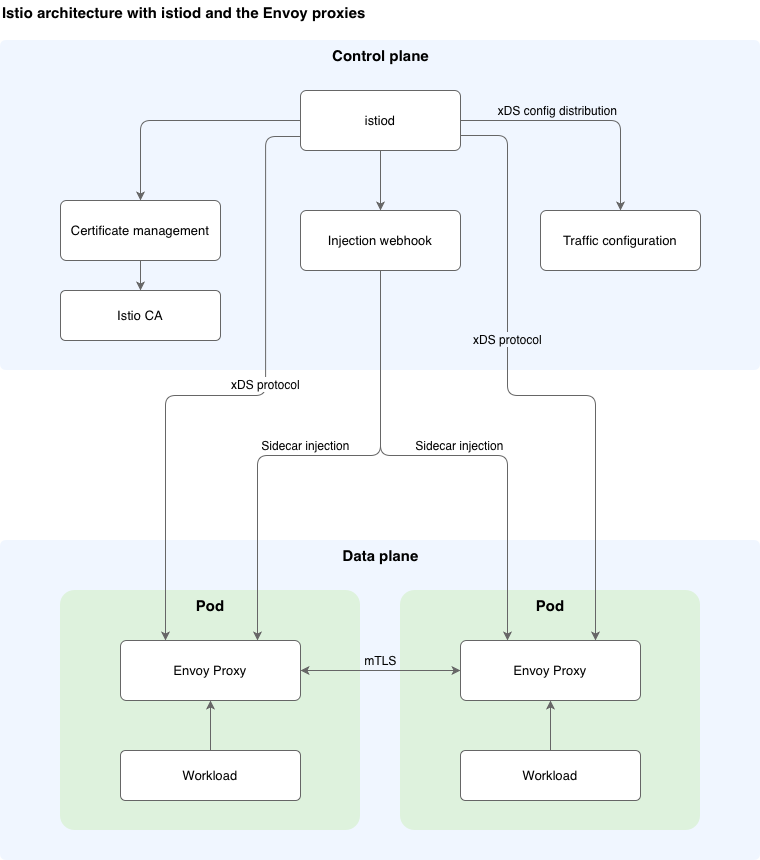
The main component of Istio is istiod, which is responsible for the following tasks:
- Managing and propagating the configuration from Kubernetes resources to the service mesh
- Injecting the istio-proxy sidecar
- Managing the certificates for mTLS connections
Istio propagates the sidecar configuration to the proxies with the xDS protocol. Sidecar proxies are Envoy proxies that intercept all traffic on the workloads. They work on the application layer and are part of the application Pods.
The following diagram shows the connectivity flow in the Istio service mesh.

Before a request reaches the service mesh, it first resolves the host through DNS and arrives at the cloud provider's load balancer, which forwards it to the Kubernetes Service that exposes Istio Ingress Gateway. These steps belong to the cloud provider and the Kubernetes cluster, not to the Istio module, so they are outside the scope of this guide. The following steps describe the path once the request enters the mesh.
All connections go through Istio Ingress Gateway, which is the entry point to the service mesh. Istio Ingress Gateway is deployed during the installation stage with a Kubernetes Service of type LoadBalancer. The Service exposes Istio Ingress Gateway to the external world using a dedicated IP address assigned by the cloud provider. You expose services through Istio Ingress Gateway with the following Istio resources:
- Gateway
- VirtualService
- AuthorizationPolicy
- DestinationRule
When a request reaches the service mesh, it passes through two enforcement points before your application handles it: Istio Ingress Gateway and the istio-proxy sidecar running alongside the workload. Both are Envoy proxies that apply the configuration propagated by istiod, and either can accept, route, or reject a request. Understanding this flow helps you determine where a connection is blocked.
A request travels through the mesh in the following sequence:
- The request arrives at Istio Ingress Gateway, the entry point to the service mesh.
- Istio Ingress Gateway processes the request. It applies the security policies, such as
AuthorizationPolicyandRequestAuthentication, and matches the request against the configured routes defined by the Gateway and VirtualService resources. At this point, the request can already be rejected, for example with a403 Forbiddenor404 Not Foundresponse. - Istio Ingress Gateway opens a connection to the target workload, selected according to the matched route and any DestinationRule configuration.
- The istio-proxy sidecar of the workload receives the connection. Because the sidecar intercepts all inbound traffic, the request reaches the proxy before the application container.
- The istio-proxy sidecar processes the request. It applies the security policies that are scoped to the workload, such as
AuthorizationPolicy,PeerAuthenticationfor mTLS, andRequestAuthentication. The request can be rejected here as well, independently of Istio Ingress Gateway. - The istio-proxy sidecar forwards the connection to the application container of the workload.
- The workload handles the request and returns a response, which travels back through the same path to the client.
A failure can occur at any of these steps. If a request is rejected at step 2, the problem is in the configuration applied to Istio Ingress Gateway. If it is rejected at step 5, the problem is in the configuration applied to the workload's sidecar. If the connection never reaches step 1 at all, the issue is outside the mesh, such as DNS resolution or an external firewall.