
KEDA HTTP Add-on
Overview
The KEDA HTTP Add-on extends KEDA with the ability to scale HTTP workloads to and from zero based on incoming request rate. It works by placing an Interceptor proxy in front of your application that counts, queues, and forwards HTTP requests — enabling true scale-to-zero without losing any requests.
Architecture
The HTTP Add-on consists of three components:
| Component | Role |
|---|---|
| Interceptor | A reverse proxy that sits in front of your application. It counts incoming requests, queues them when the target has 0 replicas, and forwards them once the target is ready. |
| Scaler (External Scaler) | Exposes request-rate metrics to KEDA via gRPC so KEDA can make scaling decisions. |
| Operator | Watches HTTPScaledObject resources and configures the Interceptor routing and KEDA ScaledObjects. |
Request flow:
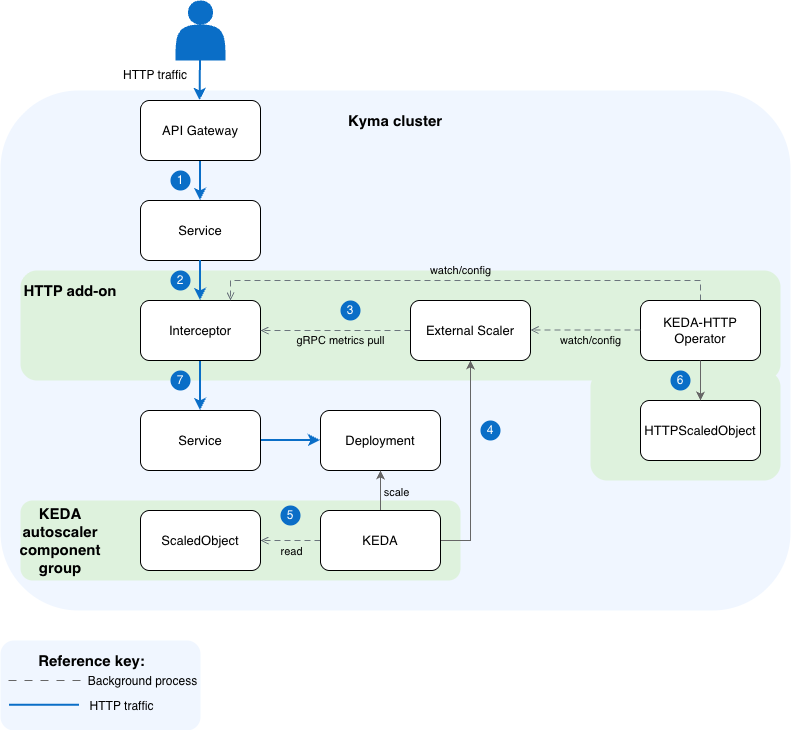
- An
HTTP requestarrives at the API Gateway, which routes traffic to the Interceptor's Service. - The Interceptor receives the request, counts it, and queues it if the target workload has 0 replicas.
- The External Scaler pulls request count metrics from the Interceptor via gRPC.
- KEDA reads metrics from the External Scaler and scales the target Deployment accordingly (including to/from zero).
- KEDA reconciles the ScaledObject (auto-created from HTTPScaledObject) to manage the scaling behavior.
- The KEDA-HTTP Operator watches HTTPScaledObject resources and configures all add-on components (Interceptor routing, ScaledObject, External Scaler).
- Once the Deployment has ready replicas, the Interceptor forwards the queued request to the application Service, which routes it to the running Pod.
Enabling and Disabling the HTTP Add-on
Enable the HTTP Add-on by annotating the Keda custom resource (CR):
kubectl annotate keda -n kyma-system default \
  keda.kyma-project.io/addon-enabled=true
Annotations Reference
| Annotation | Required | Description |
|---|---|---|
keda.kyma-project.io/addon-enabled | Yes | Set to true to install, false to uninstall. |
keda.kyma-project.io/addon-namespace | No | Namespace where the add-on is installed. Defaults to kyma-system. |
keda.kyma-project.io/addon-istio-injection | No | Set to true to enable Istio sidecar injection on the add-on Deployments. Defaults to false — the add-on Deployments are annotated with sidecar.istio.io/inject: "false" unless this annotation is explicitly set to true. When enabled, the Interceptor Deployment also receives traffic.sidecar.istio.io/excludeInboundPorts: "9090" to prevent the sidecar from intercepting internal gRPC traffic. Keda Manager also creates a port-level PERMISSIVE PeerAuthentication on port 15090 so Kyma telemetry can scrape Istio sidecar metrics over plain HTTP under mesh-wide STRICT mTLS. |
Changing the Installation Namespace
To move the HTTP Add-on to a different namespace, update the addon-namespace annotation:
kubectl annotate keda -n kyma-system default \
  keda.kyma-project.io/addon-namespace=my-new-namespace --overwrite
The controller detects the namespace change, removes only the HTTP Add-on resources from the old namespace (other Deployments, Services, etc. in that namespace are not affected), creates the new namespace, if it doesn't exist, with istio-injection=enabled, and installs the HTTP Add-on in the new namespace.
Disabling the HTTP Add-on
To disable the HTTP add-on, run:
kubectl annotate keda -n kyma-system default \
  keda.kyma-project.io/addon-enabled=false --overwrite
This removes all add-on resources from the cluster. Only the resources managed by the HTTP Add-on are removed. Other workloads in the namespace are not affected.
Uninstall Protection
The Keda Manager refuses to disable or uninstall the HTTP Add-on while any HTTPScaledObject resources exist in the cluster. This protects user workloads from losing their scaling controller and ending up with orphaned resources after the CRD is removed.
If you try to disable the add-on or delete the Keda module CR while HTTPScaledObjects exist, the Keda CR's Status.State flips to Warning and the Addon condition is set to False with reason HTTPAddonInUse. The message tells you how many HTTPScaledObjects are blocking the uninstall.
To find and remove them:
kubectl get httpscaledobjects -A
kubectl delete httpscaledobject -n <namespace> <name>
Once all HTTPScaledObjects are deleted, the Keda Manager retries automatically within about 30 seconds.
Configuring the HTTP Add-on
The HTTP Add-on components are configured using environment variables on their Deployments. You can customize them by patching the respective Deployment after installation.
Interceptor Timeouts
The most important configuration options are the Interceptor's timeout settings. These control how long the Interceptor waits during a cold start and when to forward requests to your application.
| Environment Variable | Default | Description |
|---|---|---|
KEDA_HTTP_REQUEST_TIMEOUT | 0s (unlimited) | Total wall-clock deadline from request arrival to response completion. When 0, there is no total request deadline — the request can wait indefinitely for scale-up. |
KEDA_HTTP_READINESS_TIMEOUT | 0s (unlimited) | How long to wait for the backing workload to have ≥1 ready replicas before giving up. When 0, the readiness wait is bounded only by the request timeout, giving the full request budget to cold starts. |
KEDA_HTTP_RESPONSE_HEADER_TIMEOUT | 300s | How long to wait for response headers from the backend after the request is forwarded. Acts as a safety net against hung backends. Set to 0 to disable. |
KEDA_HTTP_CONNECT_TIMEOUT | 500ms | Per-attempt TCP dial timeout when connecting to the backend. Bounded by the request context deadline. |
NOTE
If KEDA_HTTP_REQUEST_TIMEOUT is set to 0 (default), the Interceptor waits indefinitely for the target to scale up. This is the recommended setting when using the EnvoyFilter retry policy, as the retry policy on the Ingress Gateway side handles client-facing timeouts.
Interceptor Connection Pool
The following settings control the Interceptor's internal HTTP connection pool to backend services:
| Environment Variable | Default | Description |
|---|---|---|
KEDA_HTTP_MAX_IDLE_CONNS | 1000 | Max idle connections across all backend services. Increase if you proxy to many unique backends. |
KEDA_HTTP_MAX_IDLE_CONNS_PER_HOST | 200 | Max idle connections per backend service. Increase if you observe many new connection establishments under load. |
KEDA_HTTP_FORCE_HTTP2 | false | Force HTTP/2 for all upstream connections. |
Interceptor Behavior
| Environment Variable | Default | Description |
|---|---|---|
KEDA_HTTP_ENABLE_COLD_START_HEADER | true | When enabled, the Interceptor adds an X-KEDA-HTTP-Cold-Start: true response header if the request triggered a scale-from-zero. Useful for observability. |
KEDA_HTTP_LOG_REQUESTS | false | Log every incoming request (for debugging). |
Scaler Configuration
The External Scaler component has the following key settings:
| Environment Variable | Default | Description |
|---|---|---|
KEDA_HTTP_QUEUE_TICK_DURATION | 500ms | How often the scaler fetches request counts from the Interceptor. Lower values give faster scaling reactions but increase gRPC traffic. |
KEDA_HTTP_SCALER_STREAM_INTERVAL_MS | 200 | Interval (ms) between metric stream updates sent to KEDA. |
Usage: HTTPScaledObject
After the add-on is installed, create an HTTPScaledObject to configure scaling for your workload:
apiVersion: http.keda.sh/v1alpha1
kind: HTTPScaledObject
metadata:
  name: my-app
  namespace: my-namespace
spec:
  hosts:
  - "my-app.example.com"
  pathPrefixes:
  - /
  scaleTargetRef:
    name: my-app
    kind: Deployment
    apiVersion: apps/v1
    service: my-app
    port: 8080
  replicas:
    min: 0
    max: 10
  scalingMetric:
    requestRate:
      targetValue: 10
      granularity: "1s"
      window: "1m"
Key fields:
replicas.min: 0— enables scale-to-zero.scalingMetric.requestRate.targetValue— number of requests per second per replica that triggers scale-out.scalingMetric.requestRate.window— time window over which request rate is averaged.
Limitations and Throughput Considerations
1. Interceptor Is a Proxy in the Data Path
Every request to your application goes through the Interceptor. This adds:
- Latency: Approximately 1–5ms per request in steady state (non-cold-start).
- Resource overhead: The Interceptor consumes CPU and memory proportional to the request rate.
2. Interceptor Queue Capacity
When the target is at 0 replicas, the Interceptor queues incoming requests in memory. Limits:
- There is no configurable queue size limit — all requests are queued until the Pod comes up or the request times out.
- Memory pressure: Under high burst traffic to a scaled-to-zero workload, the Interceptor may consume significant memory. If it OOMs, all queued requests are lost.
- Request timeout: The Interceptor has a default forwarding timeout (configurable via
KEDA_HTTP_DEFAULT_TIMEOUT, default 3000ms for the connect phase). Requests exceeding this timeout after forwarding are dropped.
3. Scaling Latency (Cold Start Time)
The time from first request to successful response depends on:
- KEDA polling interval: Default 15 seconds (configured via
pollingIntervalon the ScaledObject). This is the delay before KEDA detects pending requests. - Pod startup time: Container pull, init containers, readiness probes, Istio sidecar injection (typically 10–60 seconds).
- Cooldown period: After traffic stops, KEDA waits the
cooldownPeriod(default 300 seconds) before scaling to zero.
Total cold-start latency: Typically 15–90 seconds depending on your Pod's startup time.
In an Istio mesh, the cold-start window can also cause 502 or 503 errors returned to the client. For details and the required EnvoyFilter configuration, see HTTP Add-on Returns 503 Errors During Cold Start.
4. No Persistent Queue
Queued requests are stored in-memory. If the Interceptor Pod restarts or is evicted:
- All queued requests are lost.
- There is no at-least-once delivery guarantee.
Summary Table
| Aspect | Value / Behavior |
|---|---|
| Added latency (steady state) | ~1–5ms |
| Cold-start latency | 15–90 seconds (depends on Pod startup) |
| Queue persistence | In-memory only (lost on restart) |
| Max queue size | Unlimited (bounded by memory) |
| KEDA polling interval | 15s default (configurable) |
| Cooldown before scale-to-zero | 300s default (configurable) |